

Industrial Cameras for Robot Arms: Choosing the Right One for Your Task
- Apr 6
- 5 min read
Updated: Apr 13
Most guides on industrial cameras are written for machine vision engineers. They cover sensor architectures, pixel pitch, interface standards, and frame rate calculations. That information matters, but it is not the first thing a manufacturer needs when they are trying to figure out which camera to put on their new cobot arm.
The first thing they need is a simpler answer: given the task this robot is supposed to do, which type of industrial camera will actually let it do that task reliably?
This post answers that question. It covers the four main types of industrial cameras used in robotics, what each one is built to do, where each one falls short, and how to match them to the robot arm applications Blue Sky Robotics customers run every day.
The Four Types of Industrial Cameras in Robotics
Industrial cameras are not all the same hardware. Each type captures visual data differently, and the differences matter enormously for robot guidance applications.
Area scan cameras capture a full 2D image in a single exposure, like a photograph. The sensor is a rectangular grid of pixels that fires all at once. This is the most common industrial camera type and the starting point for most robot vision applications. Area scan cameras work well when parts are stationary or moving slowly enough for the camera to freeze the scene cleanly. They are versatile, widely supported, and the most affordable entry point into robot-mounted or workspace-mounted vision.
Line scan cameras capture a single row of pixels at a time and build a 2D image line by line as objects pass underneath. Rather than freezing a scene, they reconstruct it continuously from motion. Line scan cameras excel where area scan cameras struggle: high-speed conveyors, large surface inspection, and cylindrical objects that need distortion-free imaging as they rotate. They are not typically used for bin picking or robot guidance on static parts, but they are the right tool for inspection tasks on fast-moving production lines.
3D cameras add depth to the picture. Rather than a flat 2D image, they produce a point cloud: a spatial map of the scene expressed as X, Y, Z coordinates for every visible surface point. For any robot task involving variable part positions, bin picking, or palletizing and depalletizing, a 3D camera is not optional equipment.
It is what allows the robot to locate objects wherever they happen to be rather than requiring them to arrive in a fixed, known position every cycle. The three most common 3D sensing methods are structured light, time of flight, and stereo vision, each with different trade-offs in accuracy, speed, and environmental tolerance.
Smart cameras are self-contained units with integrated processing: camera, processor, and vision software in a single housing. They handle basic robot guidance tasks, presence and absence checks, barcode reading, and simple pattern matching without requiring a separate computing platform. They are the fastest path to a working vision-guided cell for straightforward applications and require the least integration effort. The trade-off is limited processing power for complex scene analysis or AI-driven object recognition.
Matching Industrial Camera Type to Robot Task
The camera choice follows directly from what the robot is being asked to do. Here is how those tasks map to camera types.
Pick and place with consistent part presentation. If parts arrive in a known orientation on a fixture or tray and the robot needs to confirm location before picking, an area scan camera is sufficient. This is the most common first vision application for cobot arms. A 2D area scan camera mounted above the workspace, triggered before each pick cycle, gives the robot enough position data to handle the task reliably without the cost or complexity of a 3D system.
Bin picking and unstructured part handling. The moment parts are in a bin, a tote, or any container where orientation is not controlled, a 3D camera is required. A 2D area scan camera cannot tell the robot how a part is oriented in three dimensions or whether it is sitting flat or tilted at an angle. A 3D camera generates the depth data the robot needs to calculate a valid grasp point on every pick, regardless of how the part landed in the bin. This is the single most impactful upgrade available to a robot cell running inconsistently on 2D vision.
In-line inspection on a production line. If parts are moving continuously on a conveyor and the robot or a separate inspection station needs to verify surface quality, dimensional compliance, or the presence of features, a line scan camera delivers uniform, high-resolution images across the entire part surface as it moves. An area scan camera attempting the same task on fast-moving parts will produce motion blur at production line speeds.
Palletizing and depalletizing with real-world pallet variation. Incoming pallets are not uniform. Layer heights shift, cases lean, and patterns vary by supplier. A 3D camera mounted overhead maps each layer as it is exposed, giving the robot accurate position data for every pick rather than relying on a programmed pallet pattern that may not match what actually arrived. This is where 3D vision pays for itself fastest on the inbound side of a warehouse or production facility.
Simple sorting, presence checks, and barcode reading. For these tasks, a smart camera handles everything in a self-contained unit without external software or a dedicated processing computer. The integration effort is minimal, the cost is low, and the reliability for well-defined simple tasks is high.
Industrial Cameras and the Blue Sky Robotics Lineup
Every robot in the Blue Sky Robotics lineup supports industrial camera integration through standard interfaces including GigE Vision, USB3, and ROS2, with open SDK access for custom vision pipeline development.
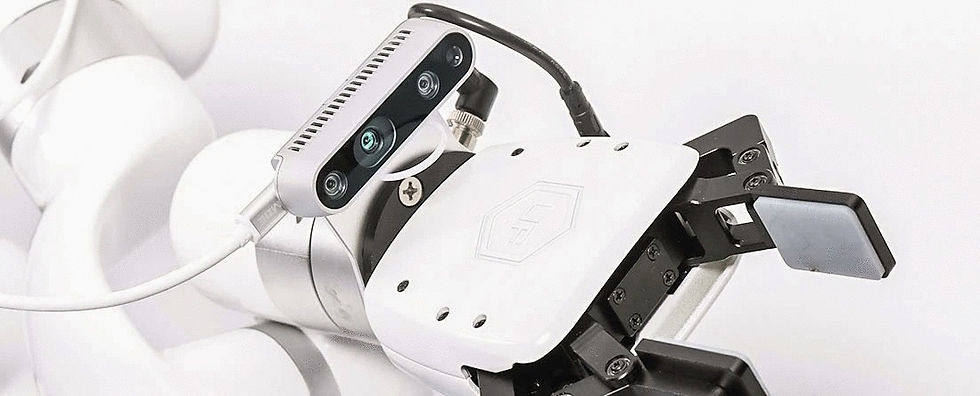
For tabletop and benchtop applications handling small parts, the UFactory Lite 6 ($3,500) pairs naturally with area scan and smart cameras for pick-and-place and inspection tasks. Its camera mounting kit is specifically designed for Intel RealSense, which is among the most accessible 3D camera options for robot vision.
For production-level bin picking and adaptive machine tending, the Fairino FR5 ($6,999) and Fairino FR10 ($10,199) work with mid-range 3D cameras covering structured light and time of flight technologies. These combinations handle real-world part variation reliably in cells running multiple shifts.
For palletizing, depalletizing, and high-payload material handling, the Fairino FR16 ($11,699) and Fairino FR20 ($15,499) are typically paired with overhead 3D cameras covering a wide work envelope, coordinated through Blue Sky Robotics' automation software.
Starting the Conversation
If you know the robot task but are not yet sure which industrial camera fits it, the Cobot Selector is a fast way to match the right arm to your application. The Automation Analysis Tool returns real numbers on feasibility and payback. And if you want to see a camera-guided cobot running on your specific type of task before committing to hardware, book a live demo with the Blue Sky Robotics team. To learn more about computer vision software, visit Blue Argus.
The right industrial camera is the one that does the job. Start with the job.